Capture Documents
Automates the capture, extraction and posting of receipts, invoices and bills – streamlining document processing from first upload to final entry in your accounting software, with review and approval built in at every step.


AI-Powered Data Extraction
Uses advanced AI to read receipts, invoices and bills and extract the financial information you need – supplier details, dates, amounts, tax and line items. Captured data is organised into transactions within generate.TAX, ready for your review before anything is posted to your accounting software.

Flexible Capture Methods
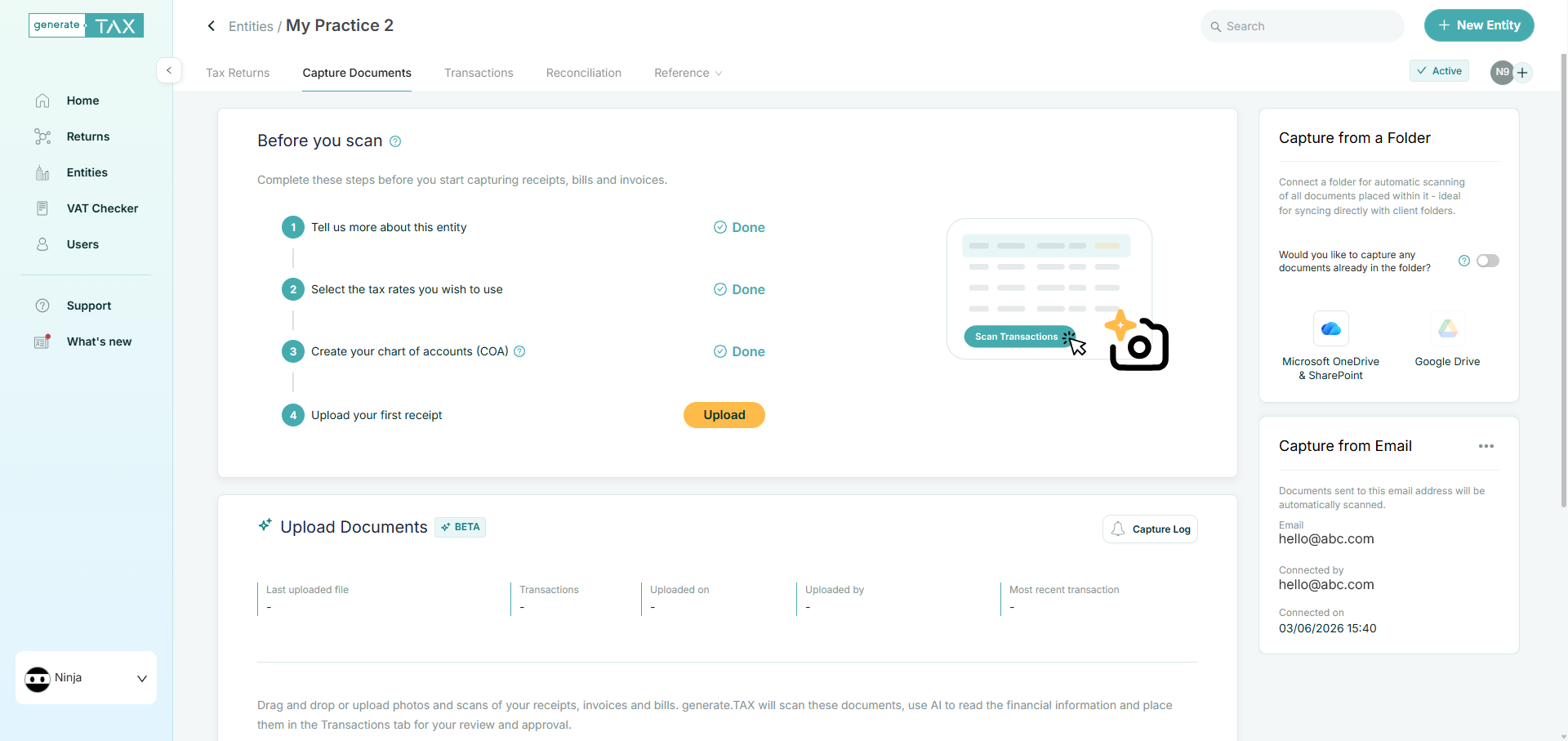
Offers multiple ways to get documents into generate.TAX to suit how your team already works. Upload photos and PDFs directly, forward documents to a dedicated capture email, or link a cloud folder (OneDrive, Sharepoint and Google Drive) for automatic scanning as new files arrive. Whether you are processing a single receipt or a batch of supplier invoices, generate.TAX adapts to your workflow and surfaces documents for review as they are captured.

Review Before You Post
Automatically converts scanned documents into transactions you can validate inside generate.TAX before they are sent to your accounting software. Review extracted data, set extraction rules, adjust any data including account codes and tax rates and tracking categories – so only accurate, verified transactions are posted to Xero, QuickBooks Online, Zoho Books or your connected platform.

Approval Workflow
Users can invite team members and set granular permissions for easier collaboration. A full activity trail is available to track each document from capture and AI extraction through to review, approval and posting – keeping accountants, bookkeepers and clients aligned from the first scan to the final post in your accounting software.
How it works
Connect with your accounting software
Seamless integration to post approved transactions with confidence
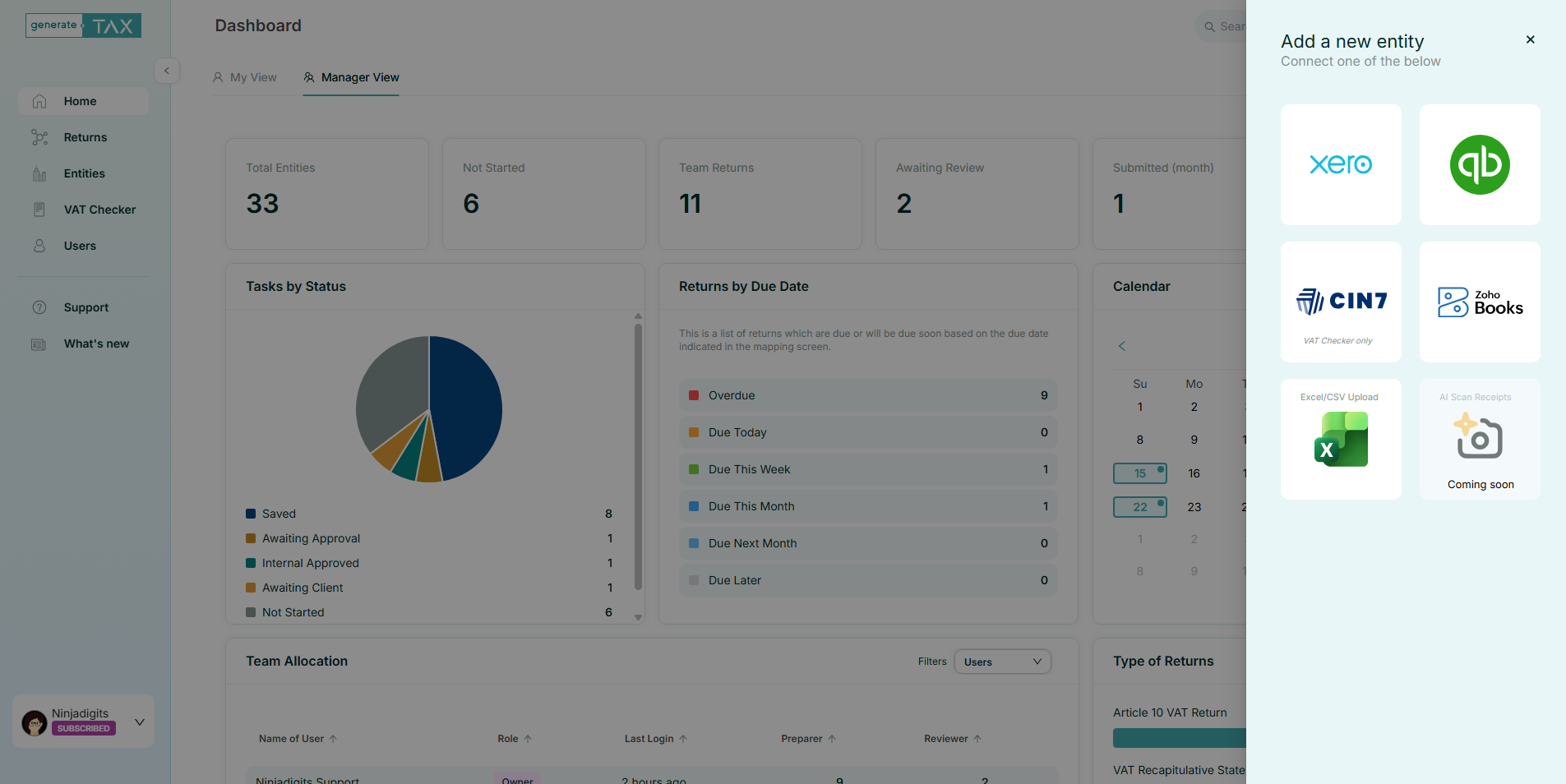
Your entity is connected to your accounting software so that reviewed and approved transactions can be posted directly from generate.TAX – without re-keying data. Set up your tax rates and chart of accounts once, and generate.TAX uses them to code captured documents accurately during review.
Integrates with Xero, QuickBooks Online, and Zoho Books.
Capture documents your way
Upload, email or sync from a folder-documents flow in automatically
Drag and drop receipts, invoices and bills, forward them to your entity’s capture email, or link a cloud folder (Google Drive or OneDrive / Sharepoint) for automatic scanning.
Documents are processed as they arrive, so your team spends less time chasing paperwork and more time on review.
Review in generate.TAX
Validate extracted data before it reaches your books
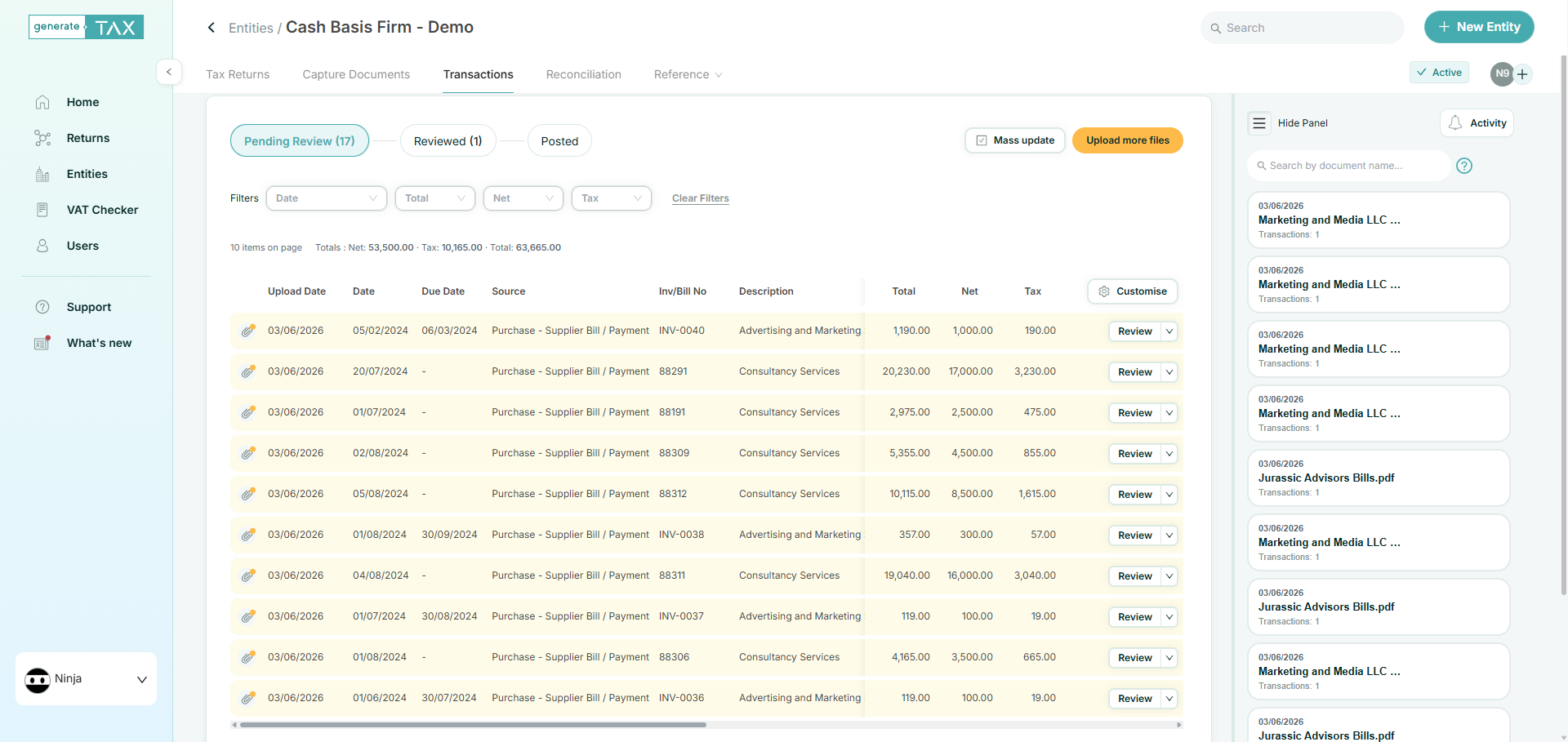
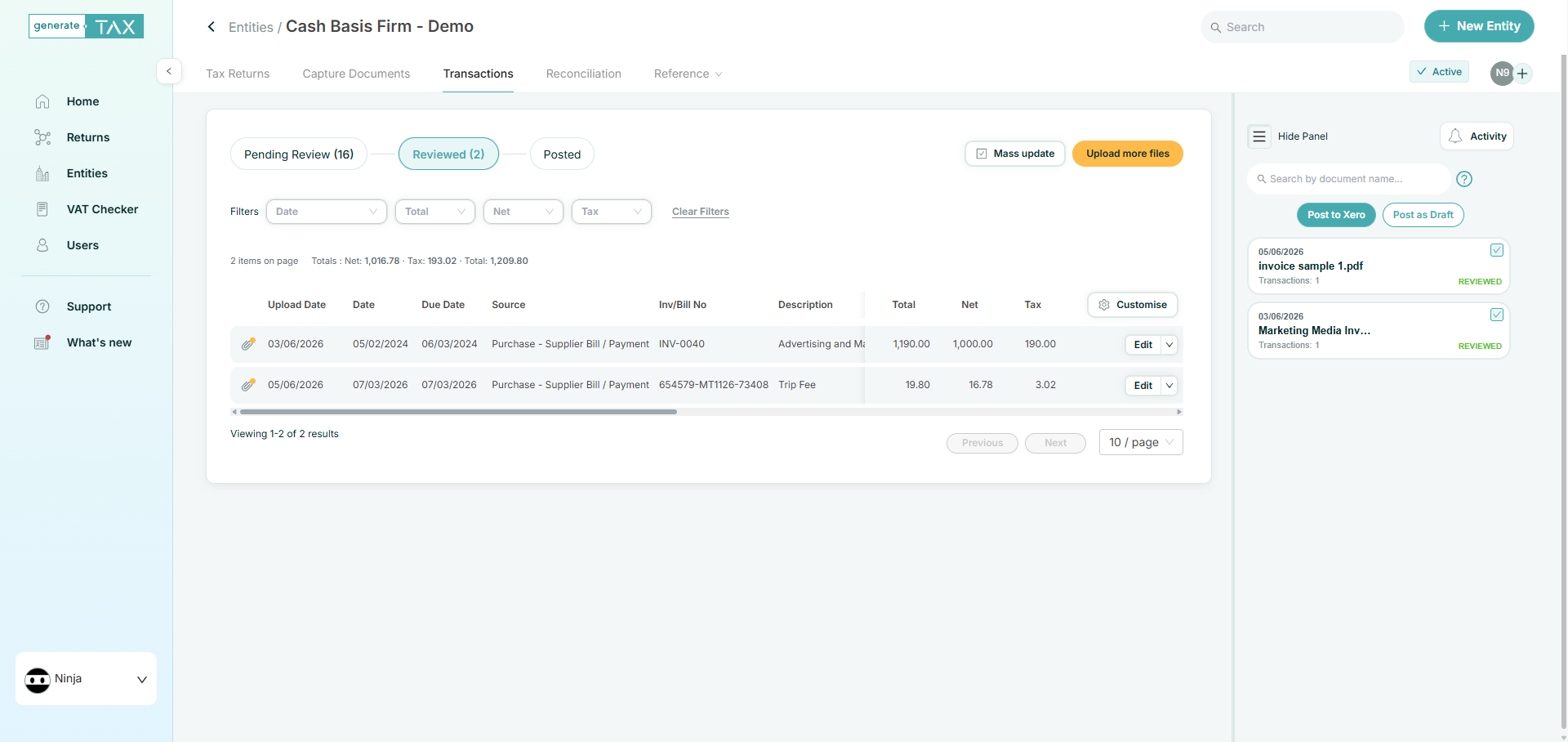
Scanned documents are converted into transactions in a centralised review workspace. Filter, edit and mass-update records in one place – so you can work through a batch efficiently and ensure every line is correct before posting. Set exctraction rules to improve the capture.
Post to your accounting software
Approve once, post with a click
Once transactions have been reviewed and approved, post them to your connected accounting software from within generate.TAX. Clear status tracking shows what is still in review, what is ready to post and what has already been sent-giving you full control over what enters your books.
Smart document handling
Breeze through exceptions and attachments with just a few clicks
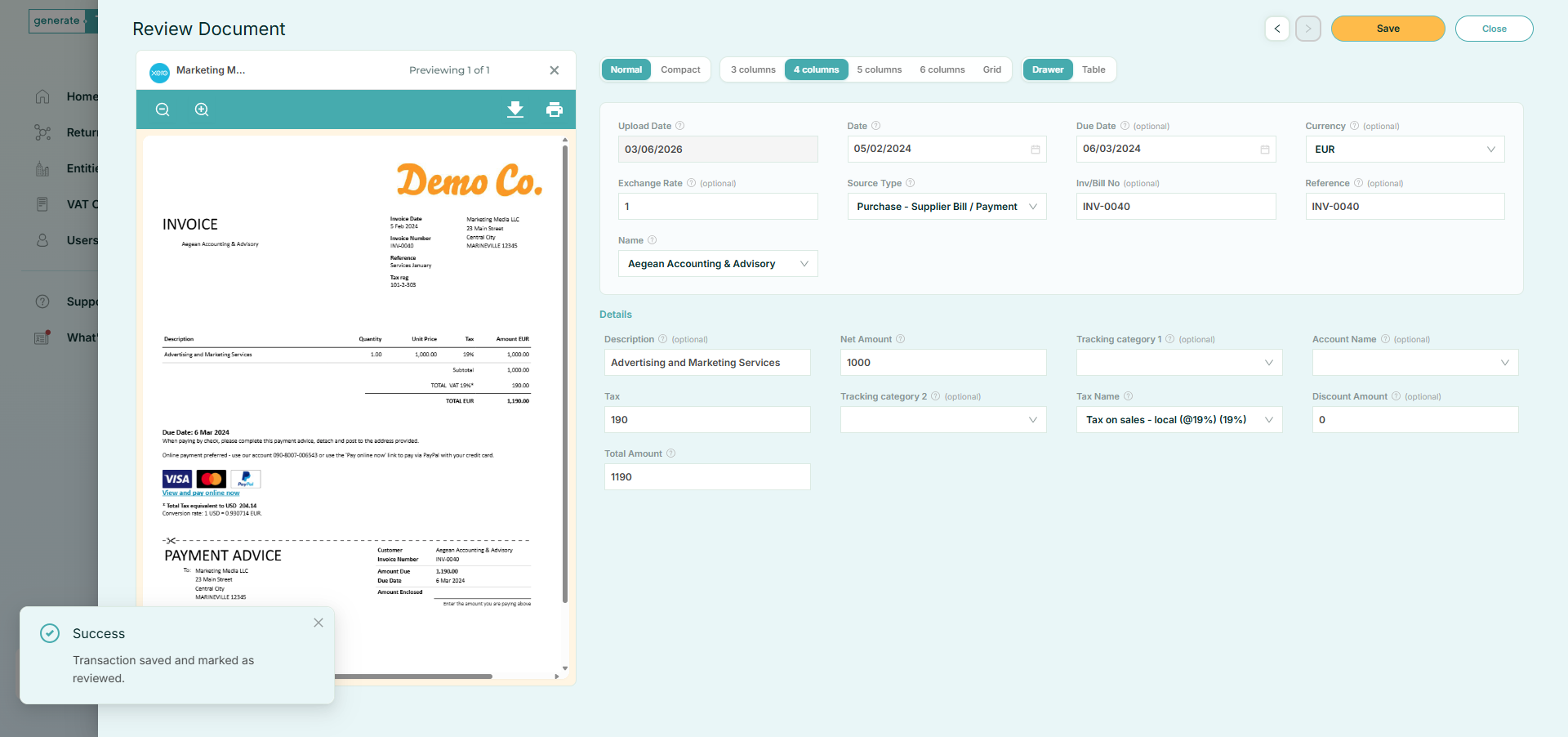
generate.TAX keeps the original document linked to each transaction, so you can verify extracted data against the source at any time. Handle duplicates, incomplete scans and coding exceptions in the review workflow-resolve issues in generate.TAX before they reach your accounting software.
FAQs
What documents can generate.TAX capture and scan?
generate.TAX can capture and scan receipts, invoices and bills supplied as images or PDFs. AI technology extracts key financial information – such as supplier, date, amounts and tax – so you can review and post transactions to your accounting software with minimal manual data entry.
Can generate.TAX integrate with my accounting software?
Yes. generate.TAX connects with Xero, QuickBooks Online and Zoho Books, allowing you to post reviewed transactions directly from the platform. Excel and CSV upload is also supported for entities where data is already digitised.
Can I capture documents by email or from a folder?
Absolutely. Each entity can be assigned a dedicated capture email – simply forward documents and they are scanned automatically. You can also link a cloud folder (such as Microsoft OneDrive or SharePoint) so that files added to the folder are captured and processed without manual upload.
How do approvals work in generate.TAX?
The approval workflow allows you to invite team members and set specific permissions for each user, streamlining collaboration. Transactions must be reviewed and approved before they can be posted to your accounting software, with a full activity trail from capture through to final posting.
Can I track the progress of captured documents within the platform?
Yes. generate.TAX provides visibility at every stage – from document capture and AI extraction, through review and approval, to posting in your accounting software. You can see which transactions are pending review, approved and posted, so nothing falls through the cracks.
How much does it cost?
The Capture Document is included in all plans – check the Pricing page to see which plan best works for your business or practice.
Try it for free
Unlock all generate.TAX features for 30 days to help you with the generation of VAT returns and capture of bills & receipts.
- Connects to your accounting software
- Safe and secure
- Cancel any time